The Closet

Photograph anything, digitize everything.

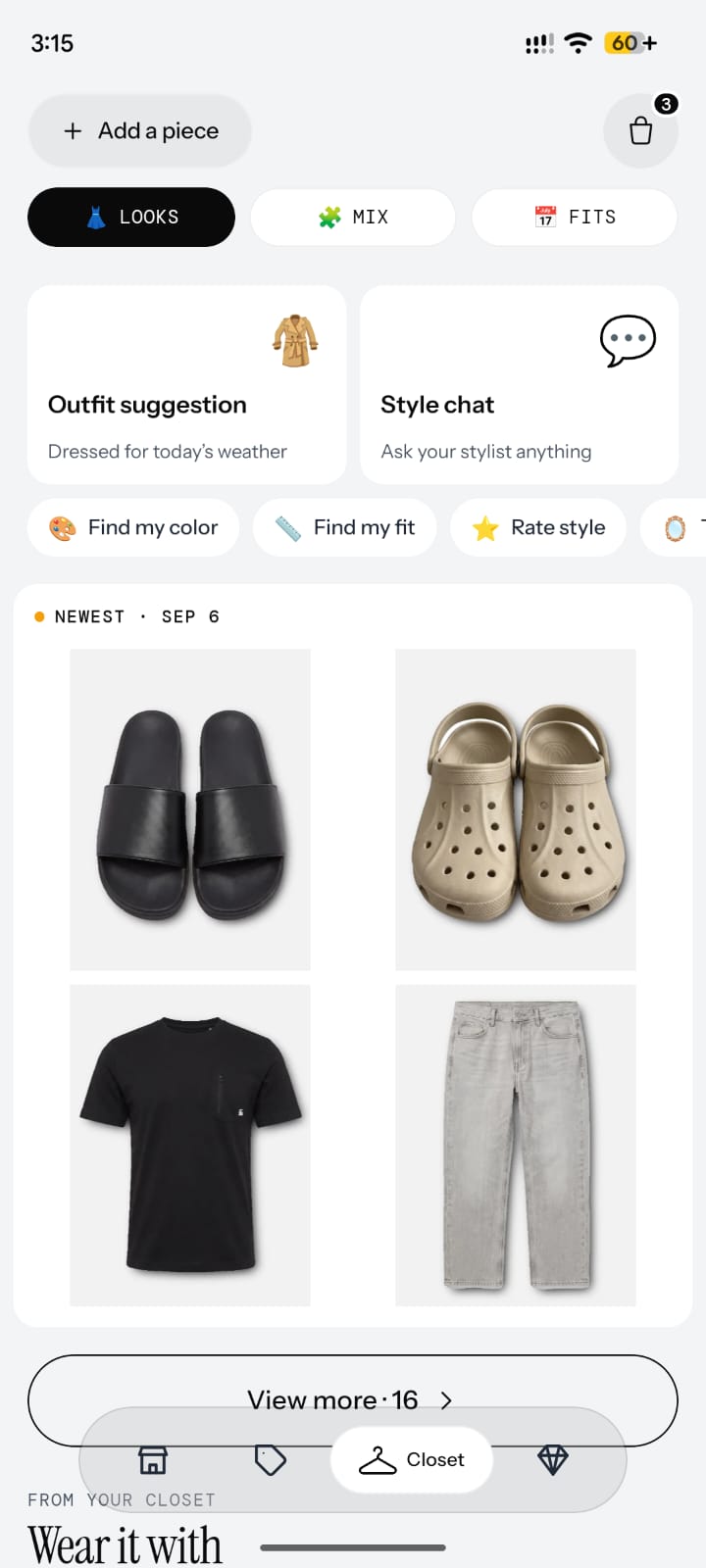
Cheeky turns your real wardrobe into a living digital collection. Every piece is photographed, categorized, searchable, and ready for styling, social sharing, and smarter shopping decisions.

Any angle AI tagging Searchable closet Styling-ready
Capture

Flat lay, hanger, or on-body. The system adapts.

Cheeky is designed around how people actually photograph clothes, not around one ideal studio setup.

AI layer

Background removal, garment recognition, and smart categorization.

Every item enters a structured wardrobe system instead of becoming another forgotten photo in your camera roll.

Inventory

Your wardrobe becomes searchable, filterable, and reusable.

Color, silhouette, category, and fabric become useful metadata that powers the rest of the product.

Downstream value

Closet digitization unlocks styling, discovery, and smarter shopping.

The closet is the foundation layer that makes recommendations, social posting, and commerce more relevant later.

01 / Photograph

Capture a garment in one tap.

Point your camera at any piece. Flat lay, hanger, or worn on-body all work inside the same intake flow.

02 / Digitize

AI understands what the item is.

Cheeky removes the background, identifies type and color, and files the garment into the right closet structure.

03 / Style

Use the wardrobe as a live system.

Once the closet exists digitally, it can drive outfit generation, smarter shopping, and future marketplace supply.

Digitize
Your wardrobe should behave like a system, not a pile.

Cheeky turns clothing from dead storage into structured inventory. Once the closet is organized at the item level, every other feature becomes more useful.

Any angle

Real-life capture works.

Cheeky is built around the way people actually use their phones, not around idealized product photography.

Auto-tagging

Metadata is created for you.

Garment type, color palette, and closet placement are inferred automatically as the item enters the system.

Searchability

Every piece becomes usable later.

A digitized item can be styled, resurfaced, compared, or listed, because it now exists as structured wardrobe data.

Longevity

Your closet stays available over time.

Every item lives in a persistent wardrobe collection instead of disappearing into camera roll clutter or forgotten drawers.

How it works

Three steps to a digital wardrobe.

The flow is deliberately simple: capture the garment, let AI structure it, then use that closet across the rest of the platform.

01

Photograph

Open Cheeky, point your camera at any garment, and capture the piece without reformatting your behavior around the app.

02

Digitize

AI removes the background, identifies category, color, fabric, and brand context, then files the item into your wardrobe.

03

Style

Mix and match from the digital closet, generate outfit suggestions, and use the same item graph across styling and discovery.

Wardrobe waste
82%

Of people own clothes they have never worn. Cheeky is designed to surface forgotten inventory and make every piece easier to use.

ClosetMaid survey, 2023

Why it matters

Digitization is the first layer of the whole product.

When clothes become structured inventory, styling gets smarter, social posting gets more contextual, and future buying or selling becomes native instead of bolted on.

Closet is not just storage. It is the data layer underneath the rest of Cheeky.

How to digitize your wardrobe with Cheeky

  1. Download Cheeky on iPhone

    Get the Cheeky-Fit app free from the App Store on your iPhone, then open it to start building your digital wardrobe. No special equipment or studio setup is required.

  2. Photograph each clothing item

    Point your camera at any garment and capture it. Flat lay, on a hanger, or worn on-body all work, so you can photograph pieces the way you naturally would.

  3. Let Cheeky's AI tag and organize it

    Cheeky's AI removes the background, recognizes each piece, and tags it by category, color, and fabric, turning every photo into a structured, organized wardrobe item automatically.

  4. Search and browse your digital closet

    Explore your searchable, filterable closet whenever you want, then use those digitized items for outfit ideas in Styling and to shop matching pieces in the Marketplace.

Frequently asked questions

What is Cheeky Closet?

Cheeky Closet is the wardrobe digitization feature in the Cheeky iPhone app. You photograph clothing and Cheeky's AI tags, organizes, and searches every piece in a structured digital closet.

How do I digitize my wardrobe?

Download Cheeky free on iPhone, photograph each garment, and let AI remove backgrounds and tag category, color, and fabric. Each piece becomes a searchable item in your digital closet.

Do I have to photograph every item myself?

Yes. You photograph your own clothes so the closet reflects what you actually own. Flat lay, hanger, and on-body photos all work; AI handles background removal and tagging.

Is my closet data private?

Your digital closet is your personal wardrobe inside Cheeky. See cheeky-fit.com/privacy for how Cheeky-Fit Inc. collects and protects data, or email privacy@cheekyfit.com.

What can I do once my closet is digitized?

Search and filter every piece, get outfit ideas in Styling, share looks on Social, and shop complementary items in the Marketplace. Digitization powers the rest of Cheeky.

Does Cheeky recognize clothing automatically?

Yes. Cheeky's AI recognizes garment type, color, and fabric after you photograph an item. It removes backgrounds and files each piece into a structured, searchable wardrobe inventory.

What photo angles work for Cheeky Closet?

Flat lay, hanger, and on-body photos all work. Cheeky is built for real-life phone photography, not studio setups. AI adapts to how you naturally capture clothes.

Can I use Cheeky Closet without the other features?

You can focus on digitization first, but Closet is designed to feed Styling, Social, and Marketplace. The more complete your closet, the more useful recommendations and discovery become.

Is Cheeky Closet free?

Yes. Cheeky is free to download on iPhone. You can start photographing and digitizing your wardrobe at no upfront cost through the Apple App Store.

How is Cheeky Closet different from Whering?

Whering focuses on wardrobe organization and outfit planning. Cheeky Closet is part of a broader AI fashion network that also includes social discovery and a 0%-commission global marketplace.

Does Cheeky work with existing wardrobe apps?

Cheeky builds a first-party digital closet inside its own app. There is no import from other closet apps today; you photograph items directly into Cheeky on iPhone.

How long does it take to digitize a closet?

Most users start with one photo and add items over time. Each garment takes seconds to capture; AI tagging and organization happen automatically after each photo.

What metadata does Cheeky tag on each item?

Cheeky tags garment category, color, fabric, and closet placement. Structured metadata makes pieces searchable and powers outfit recommendations in Cheeky Styling.

Can digitized items be used for outfit ideas?

Yes. Digitized items flow directly into Cheeky Styling, which generates daily outfit recommendations built from clothes you already own in your digital closet.

Where do I download Cheeky Closet?

Download the Cheeky-Fit app free on iPhone from the Apple App Store at cheeky-fit.com/download. Open the app and photograph your first item to begin.